Build Your Photo Story
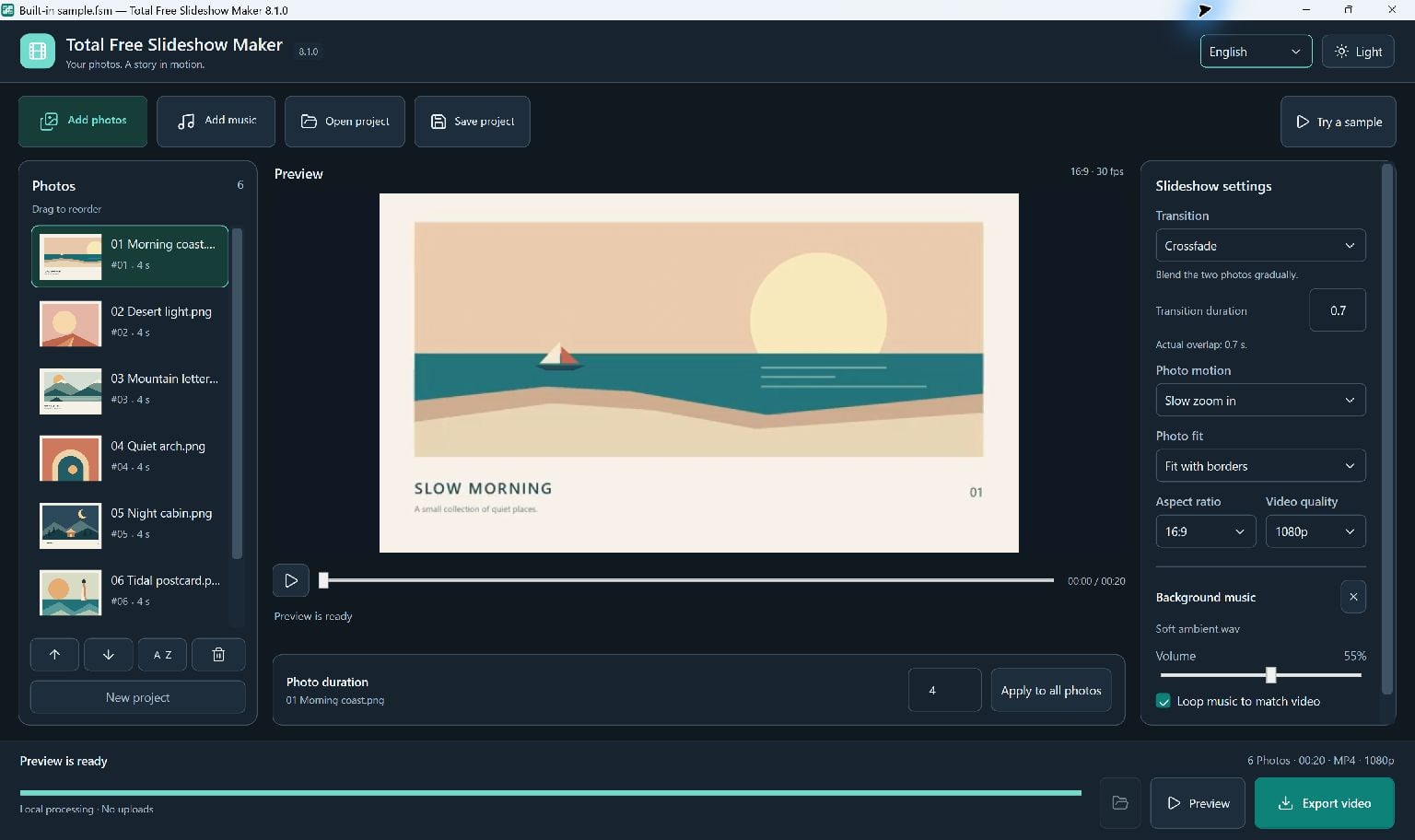
Choose Add photos and select images, or drag them into the photo area. Supported inputs include JPG, JPEG, PNG, BMP, TIF, TIFF and WebP.
Drag the photos into their playback order. Set each photo's duration or apply a single duration to every photo.
- Add the photos you want to use.
- Reorder them so the story flows.
- Set a comfortable display time for each photo.
Set The Look And Sound
Choose landscape 16:9, portrait 9:16 or square 1:1. Select a framing mode: fit with borders, fill by cropping, or a blurred background.
Transitions and photo motion apply to the whole slideshow. Add a local music file, adjust the volume, and choose looping or music fades if needed.
Preview The Timing
Preview generates a real low-resolution MP4 with the current photos, transitions and music. Play it to check that faces are framed correctly and the pace feels right.
Changes to the photos or settings require a new preview. Transition overlaps shorten the overall running time, so use the duration shown in the application.
Export And Keep The Project
Choose 720p or 1080p quality and Export video, then select an MP4 filename. The height follows that quality choice; width follows the selected aspect ratio.
Save an .fsm.json project if you want to edit later. The project references the original photos and music rather than embedding them, so keep those files together.
Keep Going
More Slideshow Maker Guides · Explore Total Free Slideshow Maker · Get Help